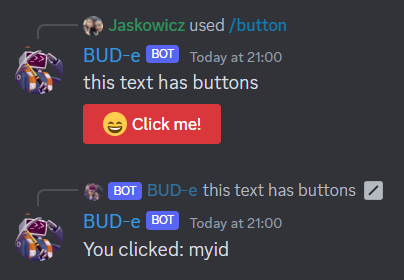
Discord's newest features support sending buttons alongside messages, which when clicked by the user trigger an interaction which is routed by D++ as an on_button_click event. To make use of this, use this code as in this example.
#include <dpp/dpp.h>
#include <dpp/unicode_emoji.h>
int main() {
dpp::message msg(event.command.channel_id, "this text has a button");
msg.add_component(
dpp::component().add_component(
dpp::component()
.set_label("Click me!")
.set_type(dpp::cot_button)
.set_emoji(dpp::unicode_emoji::smile)
.set_style(dpp::cos_danger)
.set_id("myid")
)
);
event.reply(msg);
}
});
event.reply(
"You clicked: " + event.
custom_id);
});
bot.global_command_create(
dpp::slashcommand(
"button",
"Send a message with a button!", bot.me.id));
}
});
return 0;
}
The cluster class represents a group of shards and a command queue for sending and receiving commands...
Definition cluster.h:89
std::string get_command_name() const
Get the command name for a command interaction.
Represents an application command, created by your bot either globally, or on a guild.
Definition appcommand.h:1436
std::function< void(const dpp::log_t &)> DPP_EXPORT cout_logger()
Get a default logger that outputs to std::cout. e.g.
auto run_once()
Run some code within an if() statement only once.
Definition once.h:41
@ st_wait
Wait forever on a condition variable. The cluster will spawn threads for each shard and start() will ...
Definition cluster.h:72
interaction command
command interaction
Definition dispatcher.h:789
Session ready.
Definition dispatcher.h:1072
User has issued a slash command.
Definition dispatcher.h:806
When the feature is functioning, the code below will produce buttons on the reply message like in the image below: