Need your bot to use an emoji? Then you've come to the right place! Here are three examples of using emojis.
- Note
- If your bot isn't in the guild you want to use the custom emoji from, it won't work, giving you dpp::err_unknown_emoji.
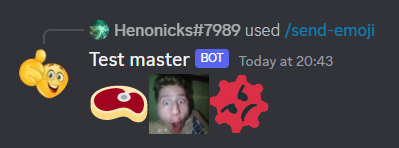
First - Sending emojis. You have to use its mention, which depends on the type. If it's a default emoji, you use the corresponding character. So, for example, if you wanted to send a nerd emoji, you would use the nerd unicode character. Now, custom emoji. There are two types: static and animated. Their mentions are <:[name]:[id]> and <a:[name]:[id]>, where [name] means the emoji name and [id] is for its ID. When you send such mention, it automatically gets converted into your emoji. Here's an example of sending emojis:
#include <dpp/dpp.h>
#include <dpp/unicode_emoji.h>
int main() {
dpp::emoji shocked(
"vahuyi", 1179366531856093214);
event.reply(dpp::unicode_emoji::nerd + shocked.get_mention() + mad.get_mention());
}
});
bot.global_command_create(
dpp::slashcommand(
"send-emojis",
"Send the emojis", bot.me.id));
}
});
return 0;
}
The cluster class represents a group of shards and a command queue for sending and receiving commands...
Definition cluster.h:89
Represents an emoji for a dpp::guild.
Definition emoji.h:64
std::string get_command_name() const
Get the command name for a command interaction.
Represents an application command, created by your bot either globally, or on a guild.
Definition appcommand.h:1436
std::function< void(const dpp::log_t &)> DPP_EXPORT cout_logger()
Get a default logger that outputs to std::cout. e.g.
auto run_once()
Run some code within an if() statement only once.
Definition once.h:41
@ e_animated
Animated emoji.
Definition emoji.h:53
@ st_wait
Wait forever on a condition variable. The cluster will spawn threads for each shard and start() will ...
Definition cluster.h:72
interaction command
command interaction
Definition dispatcher.h:789
Session ready.
Definition dispatcher.h:1072
User has issued a slash command.
Definition dispatcher.h:806
Now, our bot will send our epic emojis!
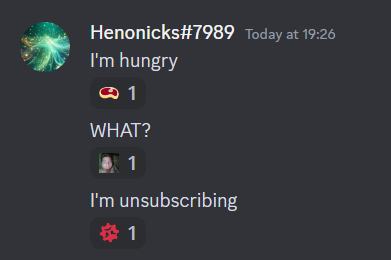
Second - Reacting to messages. Sometimes there's something so interesting in the chat that we want to react to it. While we see the emoji we react with, for bots, it's some plain text. There are different formats for different kinds of emoji when reacting too. For unicode, it's simply its character, like when sending. For custom ones it's either [name]:[id] (if static) or a:[name]:[id] (if animated). Let's show our bot's honest reactions!
#include <dpp/dpp.h>
#include <dpp/unicode_emoji.h>
int main() {
dpp::emoji shocked(
"vahuyi", 1179366531856093214);
bot.message_add_reaction(event.msg.id, event.msg.channel_id, dpp::unicode_emoji::cut_of_meat);
bot.message_add_reaction(event.msg.id, event.msg.channel_id, shocked.format());
}
else if (event.
msg.
content ==
"I'm unsubscribing") {
bot.message_add_reaction(event.msg.id, event.msg.channel_id, mad.format());
}
});
return 0;
}
@ i_message_content
Intent for receipt of message content.
Definition intents.h:112
@ i_default_intents
Default D++ intents (all non-privileged intents).
Definition intents.h:142
Create message.
Definition dispatcher.h:1746
message msg
message that was created (sent).
Definition dispatcher.h:1753
std::string content
Contents of the message.
Definition message.h:2395
Yay, our bot has emotions now!
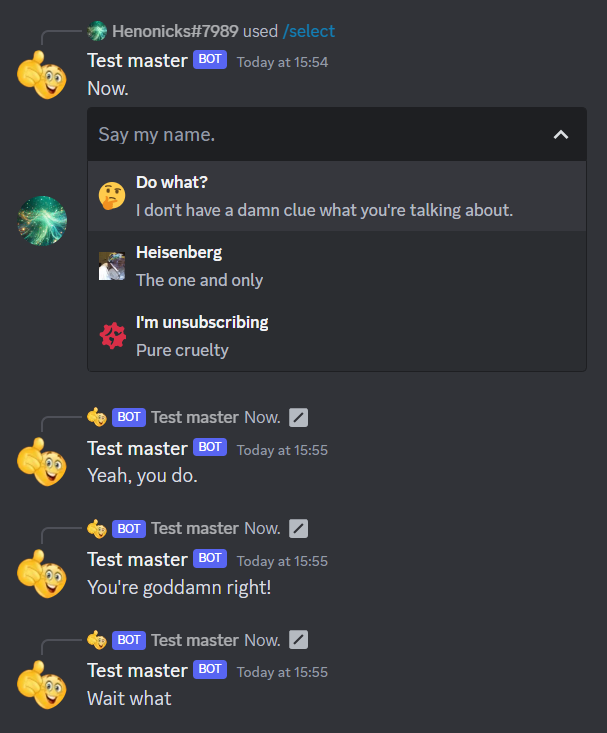
Finally, select menus. These guys are covered here. They require emoji components (name, ID, animated state) to come separately. If the emoji you're using isn't animated, you don't have to specify that. If your emoji is unicode, it doesn't even have an ID, so you only put the character, since both animated state and ID are defaulted to none (false/0).
#include <dpp/dpp.h>
#include <dpp/unicode_emoji.h>
int main() {
dpp::emoji walter(
"walter_black", 1179374919088361544);
dpp::message msg(event.command.channel_id, "Now.");
msg.add_component(
dpp::component().add_component(
dpp::component()
.set_type(dpp::cot_selectmenu)
.set_placeholder("Say my name.")
.add_select_option(dpp::select_option("Do what?", "Yeah, you do.", "I don't have a damn clue what you're talking about.").set_emoji(dpp::unicode_emoji::thinking))
.add_select_option(dpp::select_option("Heisenberg", "You're goddamn right!", "The one and only").set_emoji(walter.name, walter.id))
.add_select_option(dpp::select_option("I'm unsubscribing", "Wait what", "Pure cruelty").set_emoji(mad.name, mad.id, mad.is_animated()))
.set_id("myselectid")
)
);
event.reply(msg);
}
});
});
bot.global_command_create(
dpp::slashcommand(
"select",
"Send the select menu", bot.me.id));
}
});
return 0;
}
Click on select.
Definition dispatcher.h:953
std::vector< std::string > values
select menu values
Definition dispatcher.h:968
Yay, our context menu is now interesting!