Timers are a great way to run something every x seconds, from setting the bot's status, to maybe even doing a http request! Luckily, D++ makes this incredibly easy by providing an easy-to-use timer system! This tutorial will show you a couple examples on how to use timers!
First, we'll cover sending the D++ logo every 10 seconds!
#include <dpp/dpp.h>
int main() {
bot.message_create(
dpp::message(1140010849432522843,
"").add_file(
"image.png", callback.
body));
});
}, 10);
});
}
The cluster class represents a group of shards and a command queue for sending and receiving commands...
Definition cluster.h:89
std::function< void(const dpp::log_t &)> DPP_EXPORT cout_logger()
Get a default logger that outputs to std::cout. e.g.
@ m_get
GET.
Definition queues.h:190
@ st_wait
Wait forever on a condition variable. The cluster will spawn threads for each shard and start() will ...
Definition cluster.h:72
The result of any HTTP request. Contains the headers, vital rate limit figures, and returned request ...
Definition queues.h:112
std::string body
Reply body.
Definition queues.h:163
Represents messages sent and received on Discord.
Definition message.h:2350
Session ready.
Definition dispatcher.h:1072
If all went well, you should get the D++ logo sent every 10 seconds to your desired channel!
Now, let's make the same timer a one-shot timer, meaning it will only run once!
#include <dpp/dpp.h>
int main() {
bot.message_create(
dpp::message(1140010849432522843,
"").add_file(
"image.png", callback.
body));
bot.stop_timer(timer);
});
}, 10);
});
}
Great! Now we've learnt the basics of timers and how to stop them!
To finish off, let's make a timer that you can start and stop with commands. This example will store the timer in a map where the user is the owner of the timer!
#include <dpp/dpp.h>
std::map<dpp::snowflake, dpp::timer> user_timers{};
int main() {
if (user_timers.find(event.command.usr.id) != user_timers.end()) {
event.reply("You've already got an in-progress timer!");
return;
}
bot.message_create(
dpp::message(channel_id,
"This is a timed message! Use /stop_timer to stop this!"));
}, 10);
event.reply("Started a timer every 10 seconds!");
}
if (user_timers.empty()) {
event.reply("There are no timers currently in-progress!");
return;
}
else if (user_timers.find(event.
command.
usr.
id) == user_timers.end()) {
event.reply("You've don't currently have a timer in-progress!");
return;
}
event.reply("Stopped your timer!");
}
});
bot.global_bulk_command_create({ start_timer, stop_timer });
}
});
}
snowflake channel_id
Optional: the channel it was sent from.
Definition appcommand.h:1043
std::string get_command_name() const
Get the command name for a command interaction.
user usr
User object for the invoking user.
Definition appcommand.h:1073
snowflake id
Unique ID of object set by Discord. This value contains a timestamp, worker ID, internal server ID,...
Definition managed.h:39
Represents an application command, created by your bot either globally, or on a guild.
Definition appcommand.h:1436
A container for a 64 bit unsigned value representing many things on discord. This value is known in d...
Definition snowflake.h:54
auto run_once()
Run some code within an if() statement only once.
Definition once.h:41
interaction command
command interaction
Definition dispatcher.h:789
User has issued a slash command.
Definition dispatcher.h:806
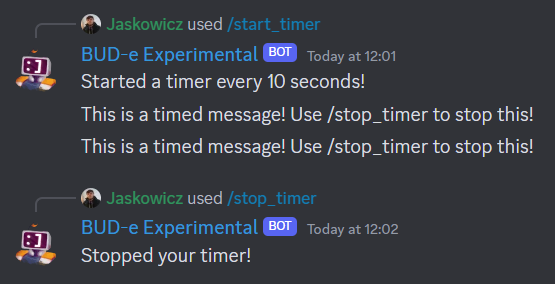
If that went well, it should work something like below!
Great, now you've learnt how to store timers to manage at a later point!